

In modern marketing, personalization is a baseline condition for a brand’s survival. Customers expect to be recognised, to have their preferences remembered and to be spoken to in their own language. Faceless mass communication works against the business: it lowers engagement, blurs the value of the offer and — critically — hits LTV and the speed at which acquisition spend comes back.
This article, drawing on two decades of work with customer bases and on current Gravity Field cases, covers concrete, reproducible mechanics rather than abstract concepts. You will see exactly how personalization of ads, email and push campaigns, and of chatbot behaviour, turns a random visitor into a returning customer.
In short: the key steps towards higher LTV
1. Collect the context: abandon the “broad sample” in favour of micro-segmentation based on UTM tags, on-site behaviour and lifecycle stage.
2. Make the dialogue proactive: replace reactive support with scenarios for a smart AI chatbot that knows what the customer was looking at a minute ago.
3. Trigger logic: set up personal triggered campaigns on events, not on calendar dates.
4. Predictive capability: use algorithms to anticipate the next purchase or the risk of churn.
5. End-to-end analytics: connect the personal offer to the traffic source and to the order that follows.
Why personalization is no longer about a name in the subject line
Before the instructions, one thing is worth pinning down: personalization in customer-base work is not the substitution of a `{Name}` variable. It is a deep understanding of the interaction context, including automatically changing the content, the personal offer or the communication channel based on the digital data collected about a specific user or segment.
Done properly, customer-centricity stops being a slogan on an office wall and becomes a tangible driver of order frequency.
Top 10 marketing personalization mechanics: from theory to rollout
The mechanics below have been validated in e-commerce practice. Each comes with a step-by-step setup on the example of the Gravity Field platform, which lets you build these scenarios without going deep into code.
Mechanic 1. Chatbot personalization based on behaviour and browsing history
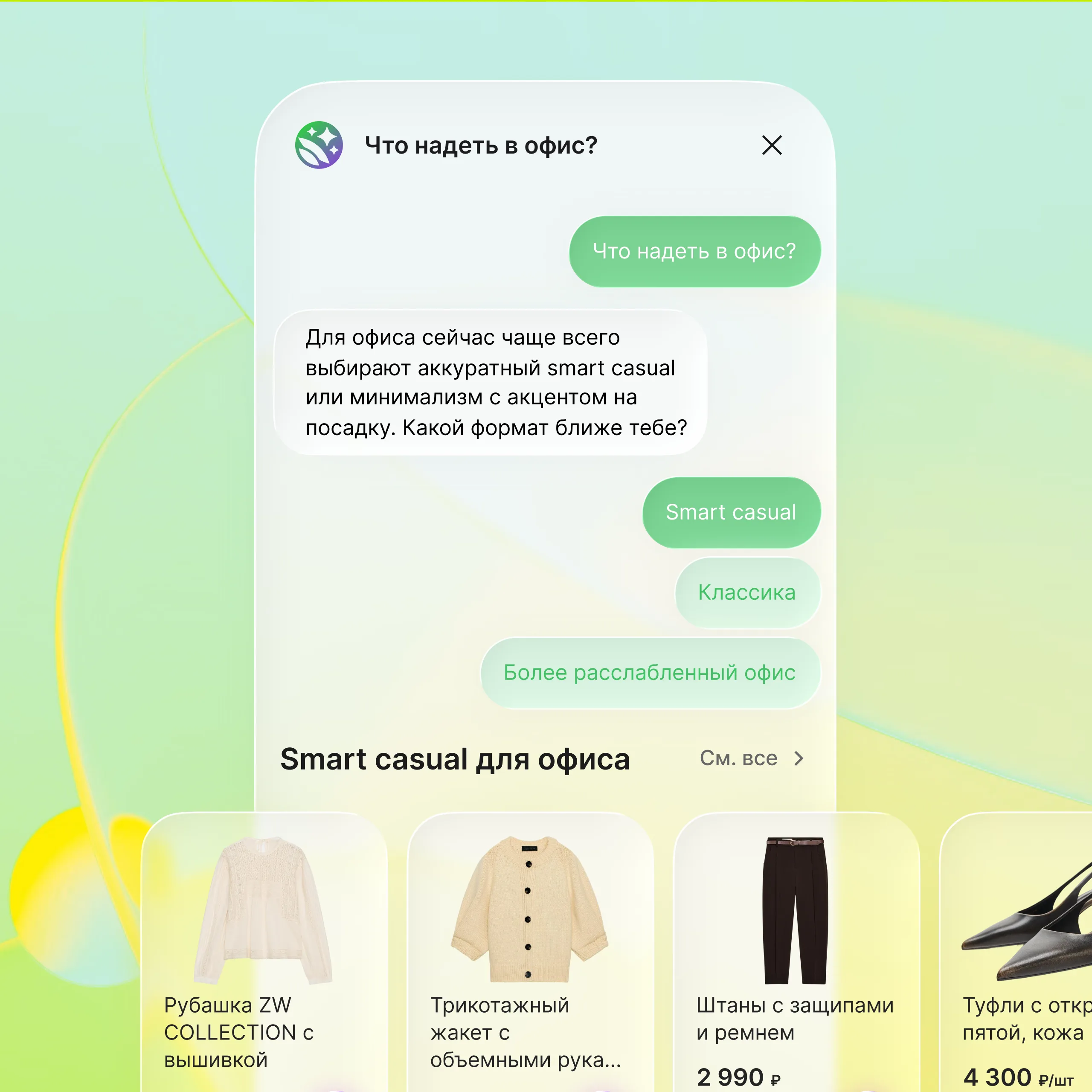
Impact on LTV and payback: a customer arriving from an ad for a specific sneaker brand sees in the chat not “How can I help you?” but “Looking at Nike trainers? Shall I find your size or show alternatives?”. That shortens the path to purchase by 30–40%, lifts first-touch conversion and directly affects how fast traffic spend pays back.
Step by step (in Gravity Field)
1. Create a web campaign. A new campaign of type “Chatbot” is created in the platform.
2. Train the bot on your own data. The bot learns from your store data and your sales scripts, so it answers to the point instead of drifting into generalities.
3. Dynamic product injection. Through the product feed integration you configure a recommendation block that puts into the bot’s message the products likely to interest this customer in the current session, based on their interest profile and their interaction history with the store.
4. Dialogue scenario. You build a branch where the first question is personalized: “I see you came for [product name from the viewed list]. Want me to check your size or find alternatives?”. The buttons then lead either to the cart or to similar products.
> What Gravity Field adds: the platform does not merely show a banner — it changes the chat dialogue depending on the user profile, browsing history and segment, which standard live-chat widgets cannot do without heavy custom development. The key difference is deep integration of the customer profile and the recommendation algorithms with the chatbot logic and the product catalogue in real time.
Mechanic 2. Abandoned-cart push with dynamic product recommendations
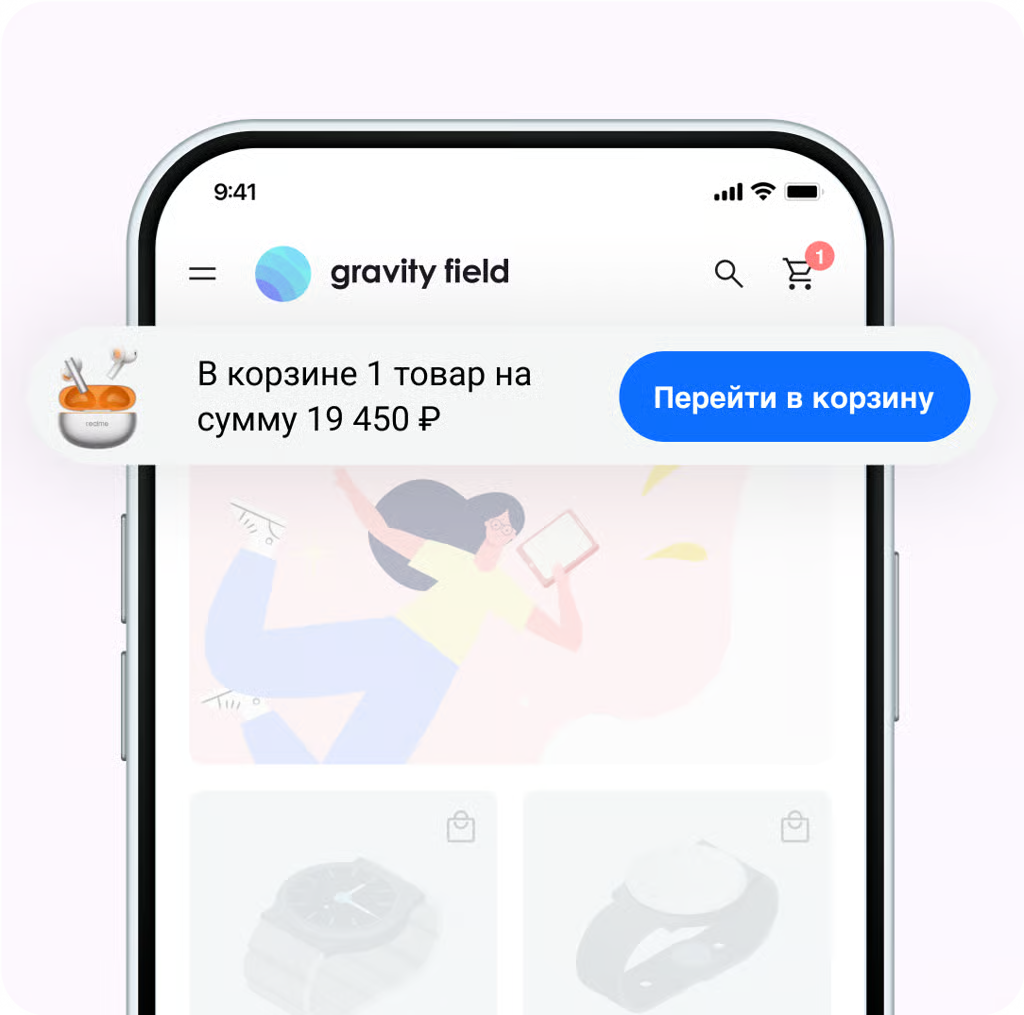
Impact on LTV: an abandoned cart is a hot lead. The standard “Come back, we are waiting” converts poorly. A push that shows exactly the product left in the cart — and possibly a small delivery discount for that customer — lifts cart recovery by 15–20%.
Step by step (in-app / web push)
1. Configure the event in Gravity Field. In the “Events” section you enable tracking of `AddedToCart` without a subsequent `Purchase`.
2. Build the lifecycle scenario. The chain is: Event X (cart abandoned) -> wait 60 minutes -> send push.
3. Personal notification content. The cart data — image, product name and price — is passed into the push settings.
4. Deep link. The tap goes not to the site in general but straight into the filled cart with that product, the personal offers and the recommendations.
The result is a single marketing scenario: the user adds a product to the cart → the user abandons the cart → a push goes out with the cart contents → we return the user to the cart or to a dedicated landing page and re-offer the product, while dynamically building special offers for that user’s profile and segment.
Mechanic 3. UTM-based targeting to lower acquisition cost (CAC)
Impact on LTV: one of the most underrated mechanics. Visitors from the blog, from branded paid search and from a partner newsletter are three different types of customer with three different levels of willingness to pay. Showing all of them the same “subscribe for 5% off” popup is rarely the best use of the marketing budget.
Step by step
1. Segment the traffic. In the Gravity Field dashboard you create audience segments:
– Segment A: `utm_medium = cpc` & `utm_campaign = brand` (hot traffic).
– Segment B: `utm_source = blog` (cold, educational traffic).
2. Personalize the promotions. For Segment A you create a campaign offering free express delivery on orders above $50 (which lifts the average order value).
3. For Segment B you create a “new lead” campaign. Instead of a discount, offer a personalized email series on how to choose a product in the category, leading to an article that continues the blog topic.
4. Result. Bounce rate falls, and the cost per lead for Segment B drops because you collect contacts without eroding margin with discounts.
Mechanic 4. Communication personalization by lifecycle stage
Impact on LTV: has the customer been dormant for 90 days, or did they order yesterday? The answer sets the tone of the email. Lifecycle personalization prevents unsubscribes and revives dormant LTV.
Step by step
1. RFM analysis in Gravity Field (recency, frequency, monetary value). The platform segments the base automatically by how recently, how often and how much customers bought.
2. Create a reactivation campaign. Build the campaign in your email service provider and select the “churn risk” segment (no purchase in 60–90 days).
3. Personalize the email. Instead of a templated “We miss you”, the subject line and the body use Gravity Field personal recommendations, which can be pulled in via API: “How is the [product X] you bought three months ago? Time to refresh the wardrobe / restock?”.
4. Predictive layer. The system analyses the customer’s purchase history. If they have not bought for more than 45 days, a trigger fires and sends a personal promotional offer with a modest incentive on exactly the category they were interested in earlier.
Mechanic 5. UX personalization of the home page
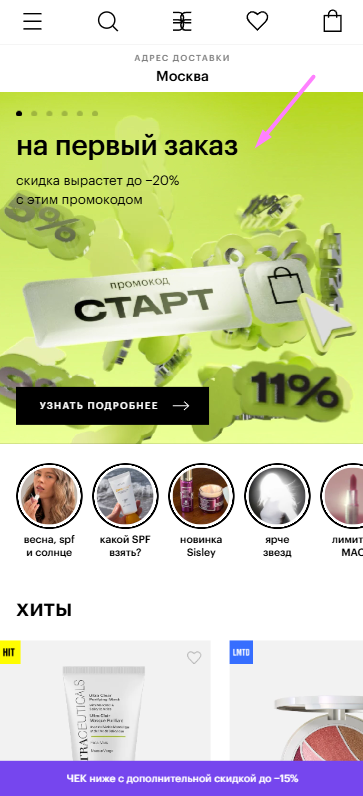
Impact on return rate: a repeat customer should not see a “20% off for new shoppers” banner. They should see “Picked for you: new arrivals in Dresses” or “Continue shopping: you were looking at these trousers”.
Step by step (dynamic interface adaptation)
1. Configure a recommendation widget in Gravity Field.
2. Pick the location: the mobile home screen, for example.
3. Display condition: the customer is logged in or identified and has placed more than two orders.
4. How it works: the platform swaps the standard “Bestsellers” product grid for a dynamic “Personal recommendations” grid built from browsing and purchase history.
5. Setup steps: in the campaign builder you select “Page: Home”, audience “Returning customers”, action “Replace the featured-products HTML block with a personal product feed”.
Mechanic 6. A geo-based popup with a countdown
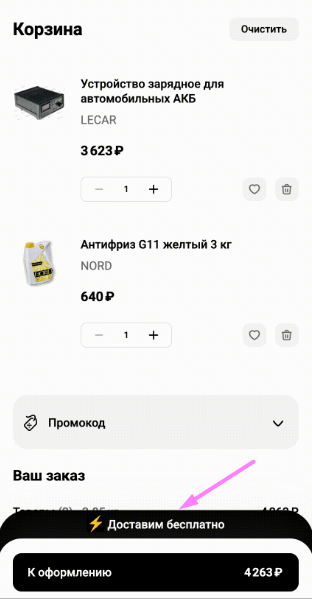
Impact on order speed: delivery speed influences purchase conversion. A customer in a major metro area may see next-day delivery. A customer in a remote region — five days. Show everybody one universal delivery estimate and part of the audience simply leaves.
Step by step
1. Create the popup in the Gravity Field builder.
2. Add the condition: `City = New York`.
3. Copy variant for that city: “Order before 3 pm — get it this evening”.
4. Copy variant for the rest of the country: “Free nationwide delivery. Expected in 3 days”.
5. Launch and A/B test. Compare banner click-through for the geo-personalized message against the generic one.
Mechanic 7. Personal triggered campaigns for repeat sales
Impact on order frequency: after an iPhone purchase you offer not a random case but a case compatible with that exact model, in the colour that dominates the customer’s browsing history.
Step by step
1. The `Purchase` event. Configure the SKU and the category of the purchased product to be passed into Gravity Field.
2. A triggered message one day after delivery, or a special offer on the post-purchase screen that lets the customer add the case to an order that has not shipped yet.
3. How the recommendations are picked: the algorithm queries the complementary-products base (“Bought together”). Items the customer already bought or viewed in the last session are excluded. Only relevant accessories end up in the email or on the post-purchase page, which lifts CTR by 25%.
Read next: How to build a “Repeat last order” mechanic
Mechanic 8. Gamification with personalized goals
Impact on LTV: “Spend $20 more and get a gift” works better when the gift is chosen from the customer’s history rather than offered blind.
Step by step (with Gravity Field)
1. Define the segment. Customers with an item from the “Accessories” category in their wishlist.
2. Trigger on add-to-cart. If the cart total is < $100, show: “Add any accessory from the promo selection and get a branded sticker pack as a gift”.
3. How to build it. The widget display conditions combine the user segment with the promotional accessories and the rule “cart total less than N”.
Mechanic 9. Social ad personalization based on on-site events
Impact on return rate: chasing every site visitor with one creative is expensive. Segmenting the retargeting audience by catalogue browsing depth lets you show different ads.
Step by step
1. Push events from Gravity Field into the ad account. Configure custom audiences based on behaviour: `viewed a product above $200`, `viewed the “Sale” category`, `was in the cart and left`.
2. Personalize the creative. For the “viewed expensive products” segment the ad leads with premium service and instalments. For the “Sale” segment — a dynamic feed of marked-down items.
Mechanic 10. In-store personalization driven by online data
Impact on omnichannel LTV: the customer browsed blue jeans in the app and walked into a store an hour later. The sales assistant — notified in the staff app — opens not with “Let me know if you need help” but with “We have just had a new batch of blue jeans in, want to see?”.
Step by step (Gravity Field API)
1. Identify the customer. Through their loyalty card number.
2. Query Gravity Field. The store assistant app sends the customer ID to the platform and requests a personal selection of blue jeans that matches the user’s style preferences.
3. Receive the recommendations. Gravity Field returns the last products viewed on web or in the app, or personal recommendations.
4. Display in the assistant app. A card pops up: “Customer is interested in [product X]. Offer an alternative or a fitting”.
What in Gravity Field solves these problems
The mechanics above sound logical, but in practice they run into fragmented data. That is where the platform earns its keep.
1. A single data layer. Unlike a “CRM + email tool + separate chatbot” stack, Gravity Field merges purchase history, site sessions, UTM sources and reactions to notifications into one customer profile. That makes personal triggered campaigns possible with conditions like “if the customer came from social, put an item in the cart, and has loyalty points on the account — offer to spend the points instead of paying”.
2. A visual scenario builder. To change chatbot logic for a specific ad campaign, a marketer does not have to file a ticket with engineering. All the targeting conditions — UTM, geo, device, behaviour — are configured through the interface described in the platform documentation.
3. Fewer changes to the store CMS. For UX personalization mechanics (swapping blocks on the site) the platform works as a customisation layer on top of the existing engine, which removes the risk of breaking the layout while rolling out predictive marketing.
How is it different from the alternatives?
Gravity Field is positioned as a CDP with an emphasis on automating real-time communication personalization at the moment of the site visit. Where another vendor offers to “send an email in an hour”, Gravity Field lets you change the site content right now, depending on who has just arrived and why.
Conclusion: where to start with personalization that pays back
1. Audit the current state: check whether UTM tags reach your CRM and your analytics.
2. Pick one quick win: do not try to roll out all ten mechanics at once. Start with popup personalization by traffic channel (Mechanic 3). It gives a fast conversion lift without rewiring the whole marketing function, and it trims ad spend.
3. Collect the data: set up tracking of product views and abandoned carts.
4. Test the hypotheses: run an A/B test where segment A sees personalized content and segment B sees the standard version. Compare LTV after 30 days.
The practical takeaway: marketing personalization is not a macro swap in a text. It is a data pipeline that turns every click and every view into an argument for the next sale. As competition tightens, personalized work with the customer base is the only way to hold margin and raise order frequency without endless price cutting.
Find out what Gravity Field does for customer return in your niche
The mechanics described here are the tip of the iceberg. Every business is unique in its LTV structure and in the behaviour patterns of its audience. Gravity Field ships with a large library of pre-built e-commerce scenarios, but their effectiveness depends directly on how precisely they are tuned to your funnel.
Rather than spending time on hypotheses, get a step-by-step rollout plan with a forecast for repeat-sales growth.
Next step: request a personal demo built around your own store. In the session our specialists will go through your current data and propose a quick-start scenario that does not require your IT department.


