
The idea for an interactive mechanic usually arrives quickly. A seasonal campaign calls for a quiz, a new category calls for a product finder, a sale calls for a promo game, the cart calls for a “spend a bit more for free delivery” mechanic. It all sounds simple. The difficulty starts when the idea has to become a working version on the site.
Two concrete examples:
- A beauty retailer wants to launch a gift finder for Mother’s Day: the shopper answers a few questions — who it’s for, budget, preferences — and gets a shortlist plus a promo code. The idea is clear, but building it takes a script, copy, design, front-end work, testing across devices and analytics wiring. The team does not make it in time for the holiday.
- An electronics retailer wants to show a short scenario right on the product page that explains the differences between models and removes the doubt before purchase. It’s a good hypothesis — but it is a separate development task, and engineering has the catalogue, payment and delivery ahead of it in the queue.
Getting an interactive live takes more than having the idea. You have to describe the scenario, write the copy, work out the branching logic, design the interface, build it, check it on different screens, wire up the events, configure the display conditions, launch — and only then find out whether it worked.
For a large product feature, that cycle is normal. For a marketing or eCommerce hypothesis, it is far too heavy. So interactives usually end up as rare special projects tied to a big sale or a brand campaign, while day-to-day work falls back on banners, pop-ups and product shelves. Not because interactives are unnecessary — but because building each one from scratch takes too long.
We have added AI Experience Builder to Gravity Field — an AI assistant that shortens the path from the idea for an interactive mechanic to a running campaign. You describe the mechanic in plain language and it assembles a first working version: the screen structure, the copy, the answer options, the branching logic, the styling and the basic behaviour.

Why interactives get stuck in the backlog
It is not that interactive mechanics are useless. Quite the opposite — a quiz, a product finder or a promo game often engages better than an ordinary banner. The problem is the cost of launching one:
- every mechanic is a mini-project of its own: script, copy, design, front-end, testing;
- it has to be adapted to different screens and checked for regressions;
- events and analytics have to be wired up, otherwise nobody knows whether it worked;
- and all of it competes for development time against more critical work.
The result is that small ideas get postponed — not because they are bad, but because there is no production window for them. AI Experience Builder removes exactly that cost: a first version of a mechanic takes minutes rather than a sprint.
What AI Experience Builder is, in plain terms
It is an AI assistant inside Gravity Field. You describe the task in words — like this, for example:
I need a Mother’s Day gift finder for the beauty category. The shopper answers a few questions: who the gift is for, budget, preferences, format. At the end they get a product shortlist and a promo code.
In response, AI Experience Builder assembles a first version of the mechanic: screens, questions, answer options, copy, branching logic and the visual block. You can open it in preview, rewrite the wording, simplify the steps, add brand accents, adjust the design — and take it to a state you are happy to show users.
But the main value is not the generation itself. The mechanic is created directly inside Gravity Field — in an environment where you can do more than look at it: you can run it as a managed campaign. The split is simple:
- AI helps you assemble the mechanic quickly: scenario, copy, interface and logic;
- Gravity Field helps you launch it in the right context: on the right page, for the right audience, with frequency caps, events, an A/B test and analytics.
What you can build
AI Experience Builder suits a wide range of interactive scenarios in an online store and in an app.
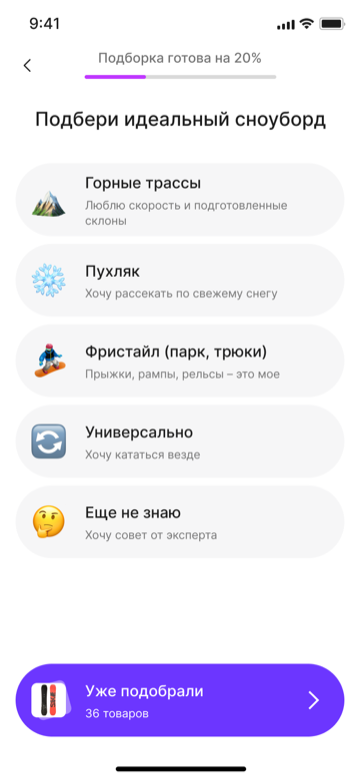
Product finders
For categories where shoppers struggle to choose on their own: beauty, fragrance, mattresses, electronics, pet supplies, clothing, gifts, homeware. The shopper answers a few questions and gets a clear result instead of a long catalogue.
Quizzes with a recommendation or a promo code
For seasonal campaigns, sales, special projects, new category launches and loyalty programmes. A quiz engages the user, collects preferences and immediately offers the next step — a product shortlist or a discount.
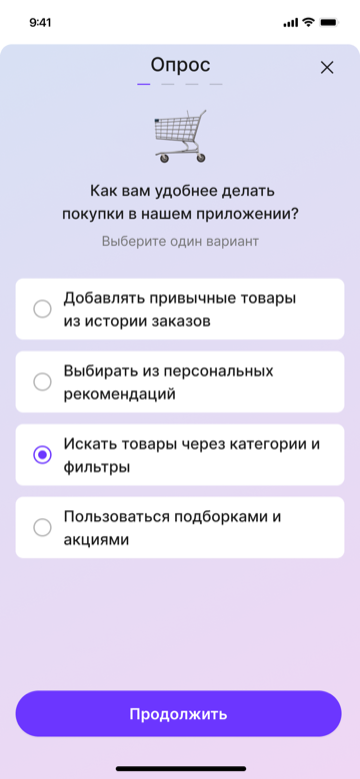
Surveys and feedback collection
To understand why people drop off, rate the service, validate demand or segment the audience. This is a short scenario running on the site or in the app, not a separate study on an external platform.
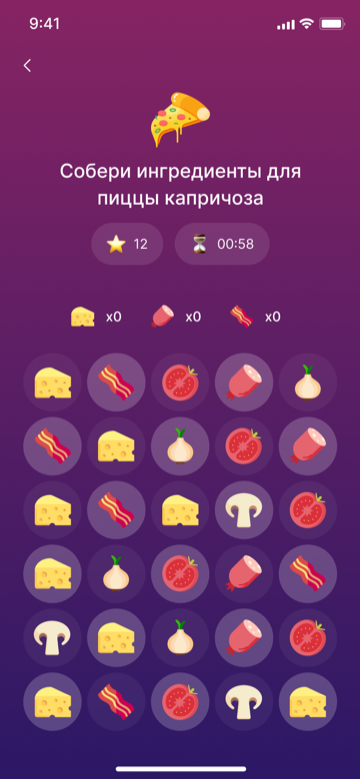
Promo mechanics and mini-games
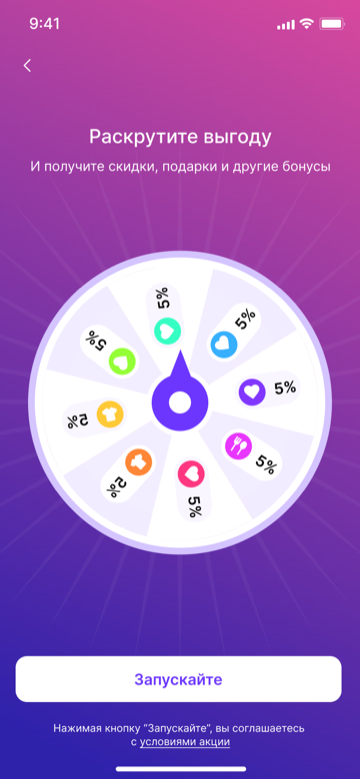
A prize wheel, prize cards, a scratch mechanic, a daily check-in, missions, game scenarios built around a sale. These make a promotion more engaging and collect extra signals about the shopper along the way.
Loyalty programme scenarios
Introducing the programme, explaining the tiers, the mechanic for earning a bonus, a personal mission, collecting interests for later personalisation. Everything that helps a user make sense of the programme and get involved in it.

Custom widgets for a campaign
An interactive block on a category page, a scenario on the product page, a mechanic for a branded special project, a dedicated promo block for one segment. The widget is built for the job rather than picked from a limited set of ready-made templates.
How the work goes
The team starts not from an empty canvas but from a description of the task. From there the path is short:
- Describe the task in plain language. For example: “A quiz for choosing skincare. The goal is to help pick a set and collect preferences: skin type, concern, budget, preferred product format. Show it to new users in the skincare category, and finish with products and a promo code.”
- Get the first version. AI Experience Builder assembles the screens, questions, answer options, copy, branching logic and the visual block.
- Edit and check it in preview. Rewrite the wording, drop unnecessary steps, add brand accents, adjust the design.
- Launch it as a campaign. Choose the page or the trigger event, set the audience, cap the frequency, set the period and switch on an A/B test if you want one.
- Read the result in analytics and decide whether to scale the mechanic, refine it or reuse it in another category.
In other words, the team gets more than a generated draft — it gets the whole path to a real launch and to an answer on whether the mechanic helped the business.
Why this matters for eCommerce
In eCommerce, promotions, assortment and priorities change fast. Teams constantly need new mechanics for sales, seasonal campaigns, categories, brands, stock levels, loyalty programmes and CRM scenarios.
Meanwhile, engineering is almost always busy with more critical work: the stability of the site and the app, integrations, payment, delivery, search, catalogue and the account area. Small interactive ideas get postponed — there is simply no production window for them.
AI Experience Builder turns those mechanics from a rare special project into a regular tool. You can test a product finder in a category, put together a promo scenario for a sale, try a mechanic in the cart, run a survey on a single segment, adapt one scenario across several categories and reuse the mechanics that worked instead of starting from scratch every time.
What the team gets
- Marketing — launches promotions and engagement scenarios faster, without a permanent dependency on development.
- CRM — gains new ways to collect preferences and work with segments directly on the site and in the app.
- The eCommerce team — improves product choice, the cart, the category and the customer journey.
- Engineering — sheds the stream of one-off requests for small widgets, quizzes, pop-ups and promo scenarios.
- The business — gets more testable hypotheses in the same amount of time.
In short
AI Experience Builder is not just a generator of quizzes, product finders and promo games. It is a way to turn ideas for interactive mechanics into working campaigns inside Gravity Field, faster.
The AI helps assemble the first version: scenario, copy, interface and logic. Gravity Field takes the mechanic to launch: audience, placement, frequency, A/B test and analytics. The result is that interactives stop being rare special projects and become an everyday tool for the team — for product choice, promotions, the cart, loyalty, feedback and personalisation.
Talk to us about launching interactive mechanics →
If you already work with Gravity Field, ask your account manager — they will explain how to enable AI Experience Builder on your project. If you don’t yet, write to us at hello@gravityfield.ai or fill in the demo request form.
FAQ
Do you need to know how to code to build a mechanic?
No. You describe the task in plain language and AI Experience Builder assembles a first working version — screens, copy, logic and styling. From there you can edit it without code.
What kinds of mechanics can you build?
Product finders, quizzes with a recommendation or a promo code, surveys and feedback collection, promo games (wheel, scratch, check-in, missions), loyalty scenarios and custom campaign widgets — on the site and in the app.
How is this different from an off-the-shelf quiz builder?
The mechanic is created directly inside Gravity Field. You can do more than display it — you can run it as a managed campaign: choose the page and the audience, cap the frequency, switch on an A/B test and see the effect in analytics.
Does the site or app need rebuilding?
No. The mechanic is delivered through Gravity Field on the pages and screens you choose — with no separate release and no storefront rework.
Can you validate a mechanic before a wide rollout?
Yes. You can show it to part of the audience only, in a single category or segment, switch on an A/B test and expand it only once the result is confirmed.
Who benefits most?
Marketing, CRM and eCommerce teams that need interactive mechanics regularly rather than once a season, and that would rather not wait for a free window in the development queue every time.


