This guide covers a method for seamlessly connecting advertising campaigns to landing pages using UTM parameters. We’ll look at how the Gravity Field personalization platform lets marketing teams turn a standard landing page into a mirror of the ad message or the special offer from a CRM campaign — significantly lifting conversion and the relevance of the experience.
In modern digital marketing, the gap between the creative in the ad and the final conversion point — the landing page — remains the single biggest reason businesses lose up to 30% of potential sales. A user clicks a tempting banner promising “20% off shirts”, lands on the site’s homepage… and the banner isn’t there. Sound familiar?
UTM targeting has traditionally been used only for end-to-end analytics and traffic source tracking. But modern technology — content and ad personalization specifically — lets you use UTM parameters not merely as an identifier in web analytics, but as a trigger that changes the user experience.
In this guide we’ll show how simple it is to adapt a landing page to any advertising campaign or special event from a CRM campaign, turning disconnected communication channels into a single high-converting mechanism.
Why does the marketing team need this?
Marketers keep running into the classic broken-telephone problem:
- The paid search specialist promises “Free delivery” in the ad.
- The user clicks through to the site.
- On the site, free delivery is buried in the footer — or missing entirely.
- The user leaves for a competitor.
UTM targeting backed by personalization mechanics solves this outright. It lets you:
- Synchronise the message: the landing page speaks to the user in the same language as the ad banner;
- Shorten the path to purchase: unnecessary questions and doubts disappear because the offer is obvious straight away;
- Sharpen your analytics: you see clearly which creative, paired with which version of the page, performed best;
- Save on development: you don’t need to build dozens of separate landing pages, one per promotion.
How it works: step by step
Getting there takes five consecutive steps that combine technical setup with creative mechanics.
Step 1: Audit your current URL structure
Before you introduce anything new, clean up what’s already there. Analyse the UTM parameters you use today.
Why: marketers often use chaotic naming (utm_campaign=summer2024_1, summer2024_2) that can’t be systematised.
What to do: design a single structure, for example:
- `utm_source` — always the channel (google, meta, newsletter);
- `utm_medium` — the traffic type (cpc, banner, newsletter);
- `utm_campaign` — the name of the promotion or product (for example, shirts_spring_sale);
- `utm_term` — the specific keyword or creative;
- `utm_content` — the audience targeting (lookalike, retargeting).
Step 2: Decide the personalization mechanic for each campaign
Here you work out exactly what should change on the site when a user arrives carrying a given parameter. There are plenty of options:
- Change the headline (H1): if the user came from a “20% off shirts” banner, the headline should say exactly that — not “Footwear catalogue”;
- Swap the hero banner: show the same promotion that ran in the ad;
- Auto-apply the promo code: if the UTM parameter carries `promo=new20`, the site can apply the discount to the cart automatically and show a notification;
- Change body copy: swap product descriptions or delivery terms depending on region or campaign.
Step 3: Read the UTM parameters and apply the rules
This is the key technical stage. You need a tool that doesn’t just collect UTM parameters but manages content on the basis of them. This is where specialised platforms come in.
What the Gravity Field platform can do here.
Instead of writing complex code for each element of the page, the platform lets you create simple rules: “If the UTM parameter contains value X, show content block Y“. That suits a marketing team perfectly, because it doesn’t require pulling in developers every time. The Gravity Field interface lets you configure channel personalization flexibly, tying incoming link parameters to on-site changes in real time.
Step-by-step: launching a personalized banner for an ad campaign
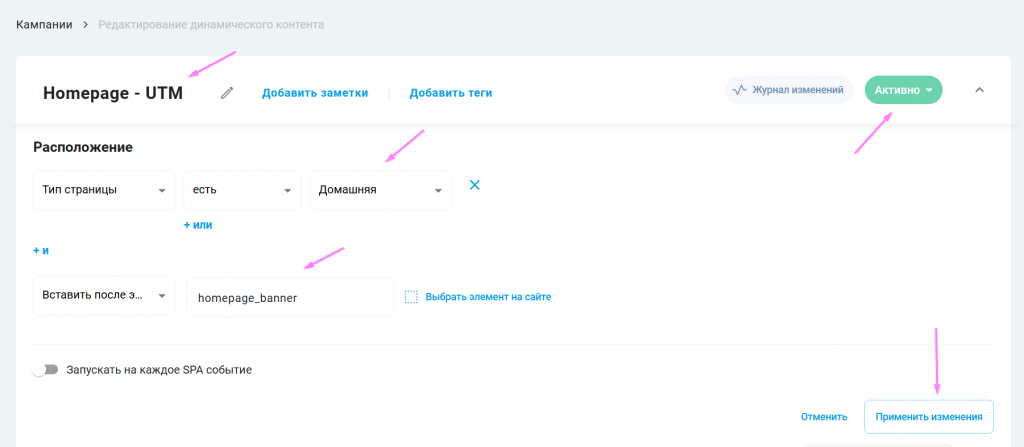
1. Create the campaign:
- give it a name;
- choose the page type (the homepage, for example);
- specify where the banner will be displayed;
- click “apply changes”.
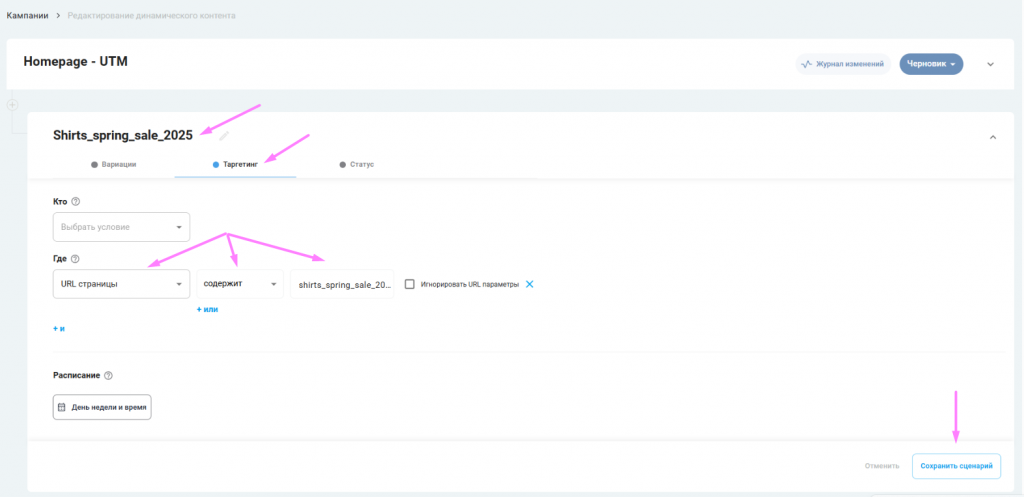
2. Create the experience and set targeting on the ad campaign:
- give it a name;
- pick the condition under which the replacement banner will show — URL contains “shirts_spring_sale_2025”;
- click “save scenario”.
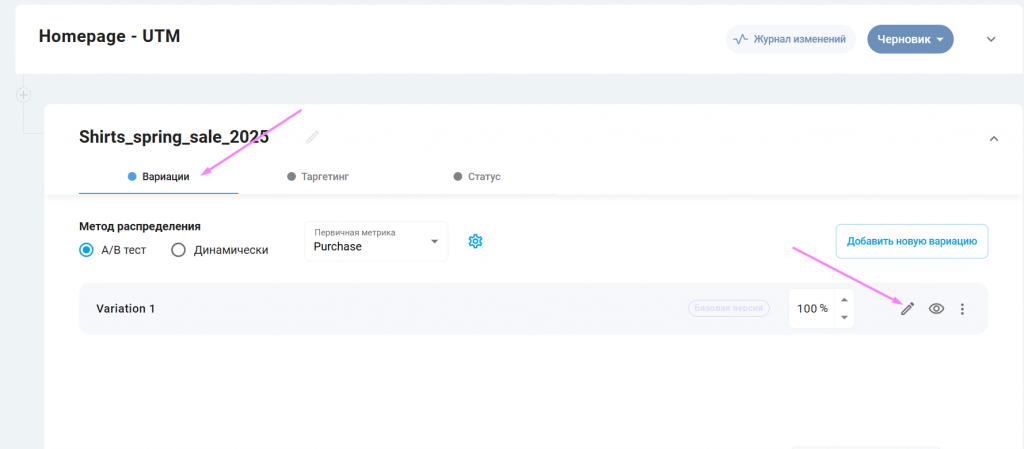
3. Go to the “Variations” tab:
- select the variation;
- build the personalized banner from a template or with custom code (this is also where you can run an A/B test, by adding a second variation — a control group without personalization, for instance);
- click “save scenario”.
4. Click “Publish”.
The result
A user who lands on the page carrying the UTM value “shirts_spring_sale_2025” sees the personalized banner instead of the default one.
Thanks to content and element replacement, the platform guarantees that every user gets the most relevant information available. When a visitor sees exactly what they were looking for, the key metrics follow — starting with conversion into a first-time buyer. A higher conversion rate at an unchanged cost per click means the cost of acquiring one customer (CAC) goes down.
The customer ends up cheaper and brings in more money. The freed-up budget can go into extending reach or testing new acquisition channels, making the whole strategy more flexible and more efficient.
Step 4: Integrate with CRM and email campaigns
One of the most powerful scenarios is the pairing of email marketing and web personalization. Imagine you send a segmented campaign to customers interested in, say, the Shirts category:
- You add the parameter `utm_content=category_shirts` to the link in the email;
- The user clicks through to the site;
- Thanks to content and ad personalization, the site adapts: the banners now show shirts, and the recommendation block displays relevant products.
This creates the effect of a personal concierge who remembers what you were looking for. It lets you adapt a landing page to a special event from a CRM campaign without building a separate page.
Step 5: Measure performance and scale
Once the campaign is live, don’t look at overall CTR alone — look at traffic quality and micro-conversions.
- Compare time on site and bounce rate between the personalized and non-personalized segments;
- Work out which “creative + personalized landing page” pairing produced the highest ROMI;
- Scale the winning pairings to other channels.
The role of technology in personalization
For this whole system to run like clockwork, you need a reliable technology base. Website builders and simple plugins usually limit how deeply you can configure anything.
The Gravity Field capabilities that address the problems described above:
- Visual rules editor: configure content-display scenarios based on UTM parameters, without code;
- Dynamic content: replace any element on the page (text, images, prices, buttons) in real time;
- Deep CRM integration: past purchases and behavioural data layer on top of the UTM parameters, creating very precise targeting;
- Real-time analytics: see how user behaviour shifts immediately after the personalization rules are applied.
Conclusion
The world is moving towards hyper-personalization. Using UTM parameters purely as an analytics instrument belongs to yesterday. Today they are a powerful lever for managing the user experience. Apply the approach described above and you can adapt a landing page to an ad campaign or a special event from a CRM campaign easily, tying every brand touchpoint together. That doesn’t only build loyalty — it feeds straight into unit economics: it lowers customer acquisition cost and raises the efficiency of every advertising dollar you spend.
The key steps to getting a result:
- Standardise your UTM naming;
- Decide what content on the site will change for each campaign;
- Configure a personalization tool (Gravity Field, for example) to read the parameters and swap the content;
- Connect the mechanic to your CRM campaigns so it works across channels;
- Launch a pilot campaign and measure the lift in conversion and the drop in CAC.
Don’t let your ad budget burn away on a mismatch between promise and reality. Start small — test one campaign against one element on the site. Book a demo call with the Gravity Field team to see how channel personalization can be set up on your project in a few hours rather than weeks. Take the first step towards marketing without gaps today.