

You may have a strong analytics team and a recommendation model of your own. Or a clear idea of the product-selection logic your store actually needs — by season, by margin, by repeat-purchase frequency.
But a model or an idea shows nothing to the shopper on its own. Between “the algorithm is ready” and “the shopper saw the recommendation and bought” there is a wide gap.
Two examples, to make it concrete:
- A furniture store trained a model that matches a mattress to sleeping position, weight and firmness. In offline tests it ranks mattresses well — but the site still shows the standard listing, and nobody can say whether the model affects orders and average order value.
- A clothing and footwear store wants products in “New arrivals” and on sale to be ranked by season and margin, not by popularity alone. The logic is worked out — but rolling it out to the storefront and comparing it with the current one requires a separate project.
Training a model is not enough to make it earn money. You have to decide where and to whom recommendations are shown, connect the algorithm to site pages and app screens, apply business rules, compare the new logic with the current one and measure the effect on clicks, orders and revenue.
If every algorithm needs its own launch system, rules and reporting built from scratch, developing recommendations turns into a long and expensive project.
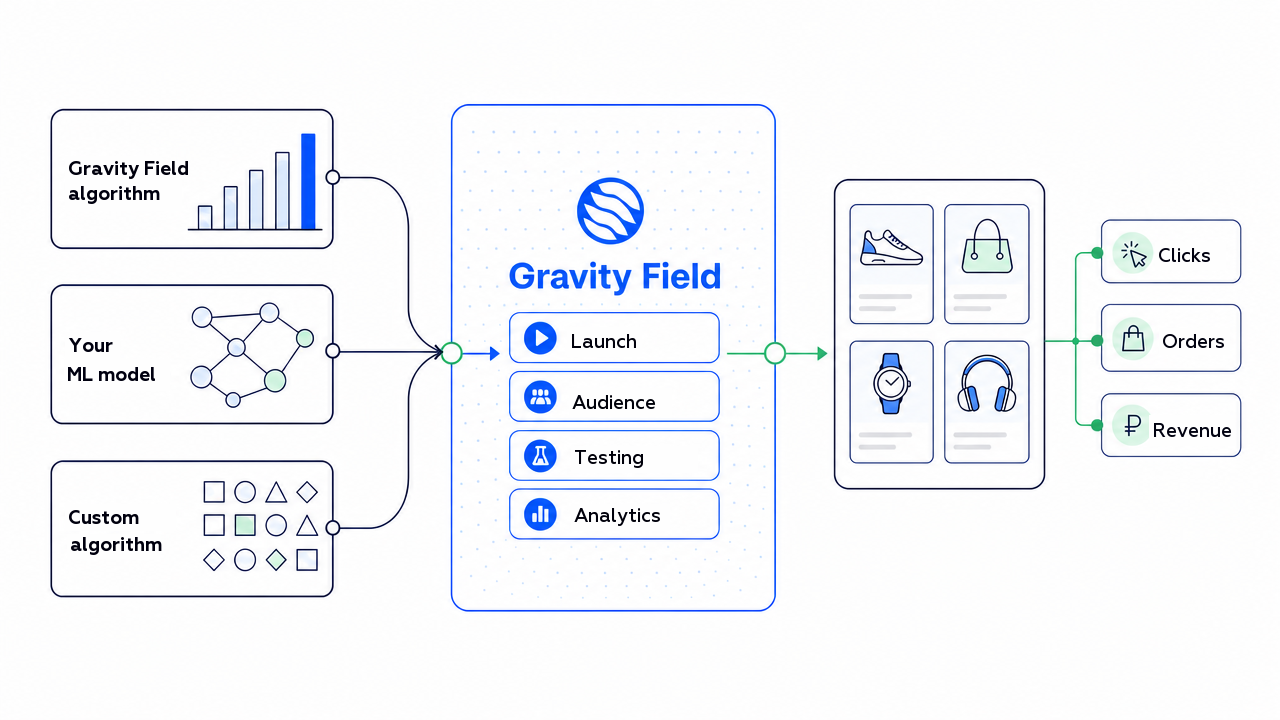
We have added RecSys Studio to Gravity Field — an environment for running your own recommendation algorithms (the BYOA approach, Bring Your Own Algorithm). You can now run models built by your team through the platform; and if you do not have a model of your own, the Gravity Field team can build a specialised algorithm for your task.
Why your own model rarely reaches the shopper
Training the model is only half the journey. What comes next is what usually eats the time:
- you have to decide which pages and which blocks show the result;
- connect the algorithm to the site storefront and the app screens;
- layer business rules on top (availability, region, promotions, category limits);
- compare the new logic with whatever is running today;
- measure not “ranking quality” but the impact on orders and revenue.
Each of those steps is a piece of work in itself. And if it has to be redone for every model, only a handful of hypotheses ever reach a real launch.
Plugging your own algorithm into the platform is exactly what closes that gap.
What “connecting your own algorithm” means, in plain terms
The algorithm decides which products, and in what order, to offer.
Gravity Field takes that output and turns it into a managed scenario: it picks the placement and the audience, applies business rules, runs the A/B test and calculates the business impact.
You do not need to build a separate control panel, launch rules and reporting for every new model. The model is connected once — from then on it uses the same launch, experimentation and analytics infrastructure as the standard recommendations.
Who this is for: examples by industry
The logic is the same everywhere: your algorithm handles the selection, Gravity Field handles delivery, rules and revenue measurement. What differs is which signals matter in a given vertical.
Gravity Field has a powerful recommendation engine of its own, and it already covers most standard tasks: similar products, “frequently bought together”, personal selections, catalogue and search ranking. The full list of ready-made algorithms is in the recommendations documentation.
Connecting your own algorithm does not replace that engine — it extends it. The best results usually come from a combination of approaches: the Gravity Field engine covers the standard scenarios, and wherever you have domain logic or special requirements of your own, your algorithm plugs in on top — all of it running inside the same scenarios, experiments and analytics.
Furniture and home goods
An expensive, infrequent purchase — what wins here is not frequency but average order value, the complete set and the removal of doubt.
- Add-ons to the anchor product: pillows, a mattress protector and a base with a mattress; cushions and care products with a sofa.
- Bundles: “bed + mattress” in the right size, “table + chairs”, a bedroom set (nightstands, chest of drawers, textiles) in a single style.
- Compatibility as a signal: your model may know size and style compatibility better than generic recommendations do.
- Alternatives when the size is out of stock, instead of the shopper leaving the product page.
A benchmark from our furniture scenarios: +3–10% in average order value from sets and accessories.
Clothing and footwear (fashion)
Heavy mobile traffic, seasonality and size barriers — the model has to account for all three.
- Seasonal products: summer footwear, suede, genuine leather; your own algorithm promotes the current season rather than the eternal bestsellers.
- Sales and promotions: ranking that highlights stock or assembles a “2+1” without wrecking the margin.
- New arrivals: separate logic so that new items do not sink under popular older stock.
- Capsules and add-ons: “shoes + bag + clothing”, care products and accessories for footwear; personal sorting by style, brand and price.
Here your own algorithm often accounts for returns, season and sale logic better than a standard model does. More mechanics are in the fashion scenarios.
DIY, home improvement and garden
Buying “for a job”: a person takes not one product but a set — combinations and repeat purchases are strong here.
- Product combinations for a job: a roller, brush, tape and primer with paint; drill bits, driver bits and fasteners with a drill; a hose and sealant with a tap.
- Manufacturer and system combinations: compatible series from one brand (profile, fasteners, parts of the same system).
- Ready-made kits: “paint a room”, “assemble furniture”, seasonal garden sets.
- Consumables and repeats: reminders and matches for a tool already bought.
- Margin as a separate signal in ranking.
Detailed mechanics are in the DIY scenarios.
E-grocery, FMCG and pharmacy
Frequent repeat orders and a large basket — everything here revolves around how fast the basket gets filled and whether the shopper comes back for the next one.
- A quick-repeat storefront: milk, bread, water, pet food, household chemicals — whatever the shopper buys regularly, right at hand.
- Replenishment by cadence: predicting “time to buy again” and reminders tuned to each shopper’s own purchase interval.
- The weekly shop and topping up: “put together a week’s groceries”, topping the basket up to free delivery or a discount threshold — this grows average order value.
- Zero-results rescue and local promotions matched to the profile: family baskets, office supply runs, products for children and pets; separate scenarios for business customers (HoReCa, offices).
Here your own algorithm is particularly strong on repeat cadence and regional assortment. A benchmark from our e-grocery scenarios: +3–11% in average order value and +7–20% in the conversion of search sessions.
Electronics
An expensive, infrequent purchase with a long decision cycle — what matters is matching by specification, accessories and services, not a discount for the sake of a discount.
- Matching and comparison by specification and use case: smartphones, work laptops, gaming devices, headphones, watches.
- Compatible accessories and services: a case, a memory card, a cable, an extended warranty, setup — the main lever on average order value.
- “Device + benefit”: instalments, trade-in, bonuses and click-and-collect instead of a plain discount — these remove the barrier of an expensive purchase.
- Continuing the search: bringing the shopper back to viewed devices and categories during a long decision cycle.
Your algorithm here can know exactly which accessories fit a specific model and how upgrade or trade-in logic works. A benchmark from our electronics scenarios: +3–10% in average order value from accessories and services.
And the other industries we work with
- Beauty: matching by skin and hair type, sets, repeat purchases of care products.
- Pet supplies: food and care matched to a specific pet, regular and predictable purchases.
- Banking and finance: matching products and offers to the customer’s profile and behaviour.
- Real estate: matching listings to budget, area and parameters in a long decision cycle.
- Telecom: plans, devices and add-on services matched to usage and customer history.
- Fast food and QSR: add-ons to the order, combos and repeating a favourite — matched to context and time of day.
The list is not closed. The same approach works anywhere there is a catalogue, a choice and repeat engagement — in travel and hotels, for betting operators, in B2B and niche marketplaces, for airlines. The signals change; the mechanics of connecting and measuring stay the same.
Situations teams usually start from
You already have a model of your own
The team has built a recommendation model for a category — it takes into account view and purchase history, product attributes and the specifics of the assortment.
Through Gravity Field you can switch it on in that category only, show it to part of the audience and compare it with the current strategy. And the answer you get is not to the question “does the model rank products well”, but to the more important one: does it help shoppers choose, and does it grow orders and revenue.
You need special logic but have no model
A store needs to account for seasonality and a long gap between repeat purchases. Standard algorithms only partly cover that.
The Gravity Field team can build a specialised algorithm for the task, connect it and test it in a chosen category. If the approach proves itself, it gets applied more widely.
The idea needs testing on a limited audience
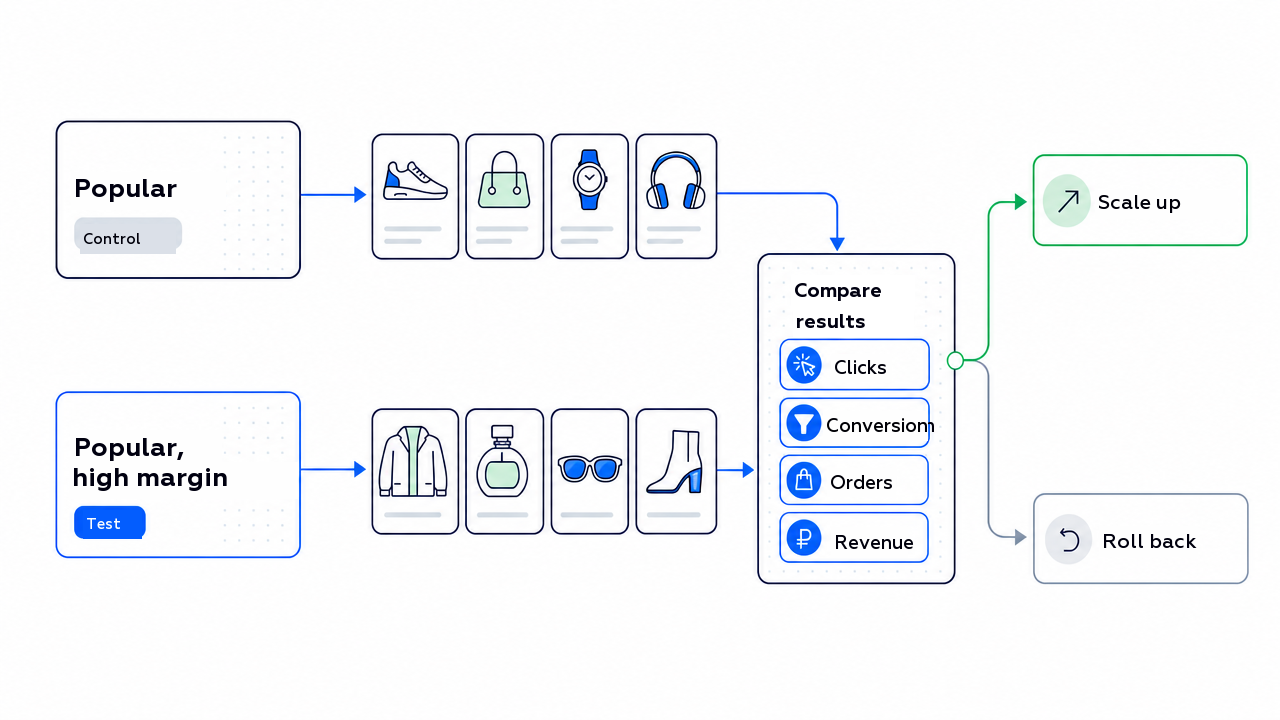
You want to compare an ordinary selection of popular products with a version that also accounts for margin.
The new logic can be launched in a single block and shown to part of the users. The decision follows the experiment — before a wide rollout and without risk to the whole storefront.
You need to ship new versions of the model
The model already runs on the storefront, but the team keeps improving it — a second and a third version appear. Swapping the model live is risky: it is unclear whether the shopper is better off, and rolling back is hard if something goes wrong.
In RecSys Studio every version is registered in the catalogue with its own number, and a new version can be rolled out in an A/B test against the current one — on part of the audience first. You raise the traffic share going to the new version only if it wins on conversion, orders and revenue, and rolling back to the previous version takes one step. Improving the model becomes a managed release cycle instead of a blind one-off replacement.
You want to mix several algorithms in one block
Sometimes a whole block should not belong to one algorithm. You want to assemble the output from several sources: some slots from your model, some from the Gravity Field recommendation engine, some from another model of yours built for a separate job. For example, mixing personal recommendations with higher-margin products and new arrivals — or handing one category to your domain model and covering the rest with the standard engine.
RecSys Studio lets you combine several algorithms into a single strategy — with weights, quotas or fixed positions in the block, and business rules on top. That is how you balance relevance against business goals (margin, clearing stock, promoting new arrivals) and at the same time cover the cold start: if your model has nothing to say about a particular user or product, the free slots are filled from the engine. The resulting mix is compared in an A/B test against output from a single source, and whichever is better for the shopper and the business is the one that stays.
How a launch works
- We define the task. For example: raise conversion in the “Footwear” category, account for repeat purchases better, or increase the share of high-margin products in recommendations.
- We connect the algorithm. It can be your model, a ready-made Gravity Field algorithm or a specialised solution for the specific task.
- We configure the scenario. We pick the page or screen, the recommendation block, the audience and the conditions under which the new logic applies.
- We run an A/B test. We compare it with the current strategy on clicks, conversion, orders and revenue.
- We expand. If the effect is there, the logic is applied to a larger audience and to other suitable sections.
How it works
The new algorithm is added to the Gravity Field catalogue — with a name, a version and the conditions under which it applies. It is then linked to a recommendation strategy for the placement you need: the home page, a category, a product page or an app screen.
The split is simple:
- your algorithm decides which products to show and in what order;
- Gravity Field receives the finished list, applies the strategy settings, decides where and to whom the recommendations are shown, and collects impression, click and purchase events for reporting and the A/B test.
There are two ways to get the algorithm’s output:
- recommendations are computed in advance and published for delivery;
- Gravity Field calls your model’s API at request time and gets the matching products back.
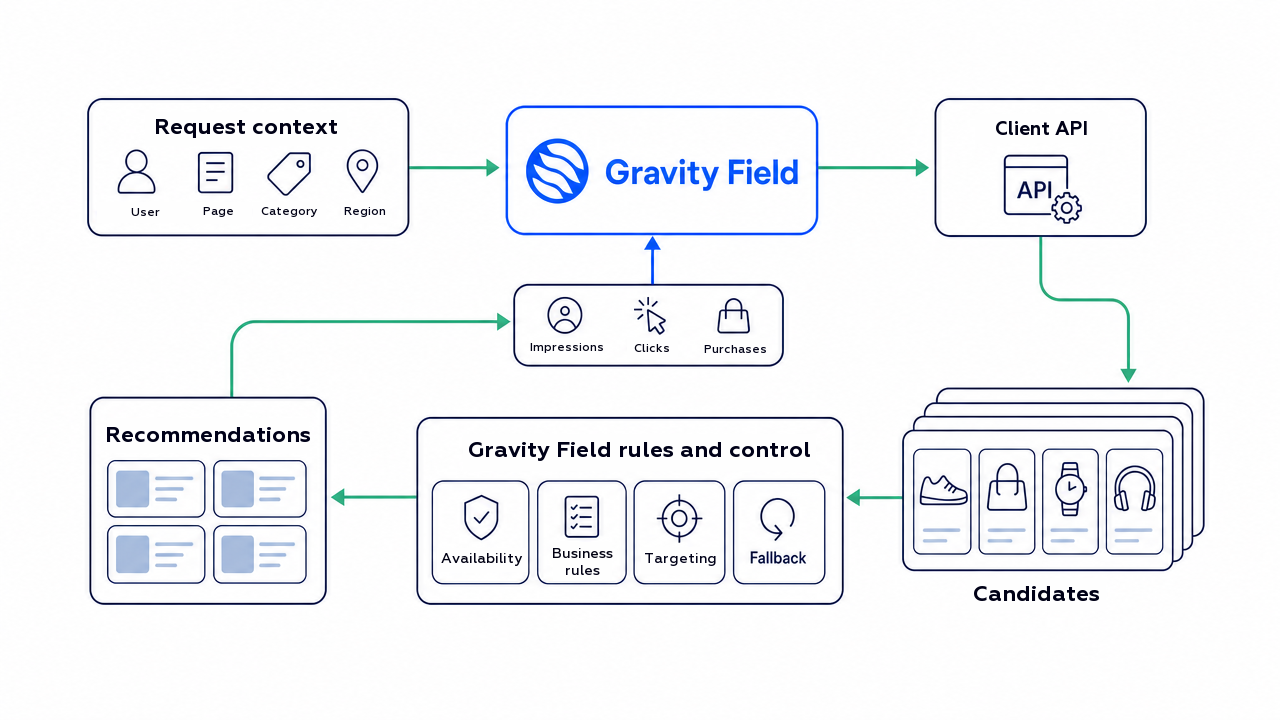
The same order of operations applies to algorithms built by the Gravity Field team. That is why different models plug into exactly the same launch, experimentation and analytics tooling.
Types of algorithms — and the nuances
“Your own algorithm” does not have to mean a heavy ML model. Different types suit different tasks, and they are often combined:
- By product attributes (attribute or content-based): by specification, category, material. Good for new products and for categories where the choice is complex (mattress firmness, paint type).
- By behaviour (collaborative): “viewed together / bought together”. Powerful, but it needs accumulated history.
- By the current session (real time): works for new and anonymous users when there is no history yet.
- Complementary products and sets: compatible items and bundles that lift average order value.
- Business rules and margin aware (re-ranking): availability, region, promotions and margin layered over the base selection.
- Repeat purchases and consumables (replenishment): matching by cadence — what a person buys again, and when.
What to watch out for:
- Cold start. On new products and new users a behavioural model has nothing to say — attribute-based matching and session signals carry you through.
- Business rules on top of the model. Even the best algorithm has to respect availability, size, region and promotions. The model proposes; Gravity Field filters and ranks by the rules.
- Seasonality and cyclicality. Furniture is bought rarely, groceries regularly; the repeat and season logic has to reflect that.
- Compatibility. Mattress size to bed, paint volume to surface area — here the store’s domain model is usually more precise than generic recommendations.
- Real time versus pre-computation. Heavy personal matching is convenient to compute in advance; fresh session signals are better fetched over the API at request time. Hence the two connection methods above.
- How to evaluate. Not by ranking metrics, but against a control group (held-out traffic) and an A/B test on revenue.
Which metrics to watch
The point is not to disappear into the technical detail but to look at the business. Technical model metrics are for the engineering team; the decision to launch is made on other numbers:
- CTR of the recommendation blocks;
- clicks through to the product page;
- add-to-cart from recommendations;
- conversion of the users who saw the block;
- average order value and revenue.
The main question is whether the shopper now finds what they need faster and buys more often.
What to keep in mind today
For now, connecting a new algorithm happens together with the Gravity Field team. This is not yet a fully self-service mode where any algorithm is added from the dashboard without prior setup.
Before launch the teams agree on the task, the format of the input and output data, the acceptable response time, the pages and blocks, and the A/B test metrics. After that the algorithm is registered in the catalogue and linked to the relevant strategies.
That order of work connects the technical implementation to the business task from the start: engineering understands the requirements for data exchange and load, and the business team knows where the algorithm will run and which numbers show whether it helps.
In short
A model built by your team does not need a separate set of launch, management and analytics tools.
Gravity Field helps you put its output to work in real scenarios: control the placement and the audience, run A/B tests, measure the effect on revenue. And if you do not have a model of your own but the standard recommendations are not enough, the Gravity Field team can build a specialised algorithm for the task.
In both cases the goal is the same: to turn new recommendation logic into a working scenario faster, and to check whether it helps shoppers and the business.
Talk to us about connecting your own or a specialised algorithm →
If you already work with Gravity Field, contact your account manager — they will walk you through the details for your project. If you do not yet, write to us at hello@gravityfield.ai or fill in the demo request form.
FAQ
Can we connect an algorithm our own team wrote?
Yes. That is the essence of BYOA: your model selects the products, and Gravity Field handles delivery, business rules, the A/B test and the analytics.
And if we do not have a model?
The Gravity Field team can build a specialised algorithm for your task and connect it to the same launch and experimentation tooling.
Which industries does this work in?
The mechanics are the same across verticals — only the signals change. Furniture and home: sets and average order value; fashion: season, sizes and sales; DIY: job-based combinations and consumables; e-grocery: repeat orders; electronics and beauty: complex choices and sets.
Does it have to be a complex ML model?
No. Attribute-based matching, margin-aware rules and behavioural models all work — and they are often combined.
Do we need to rebuild the site or the app?
No. The algorithm is linked to the recommendation blocks that already exist on the pages and screens you need.
How do we know the new algorithm actually works?
Through an A/B test: the new logic is compared with the current strategy on clicks, conversion, orders and revenue — not only on the model’s technical metrics.
Can we test on part of the audience first?
Yes. The algorithm can be launched in a single category, region or product block and shown to some of the users, and expanded only once the effect is confirmed.


